Registering to Bid
Register once on crossroadsellers.com, then register to bid at each auction house from one of its lots; the house approves you and gives you a paddle number.
Registering is two small steps, and you only do the first one once.
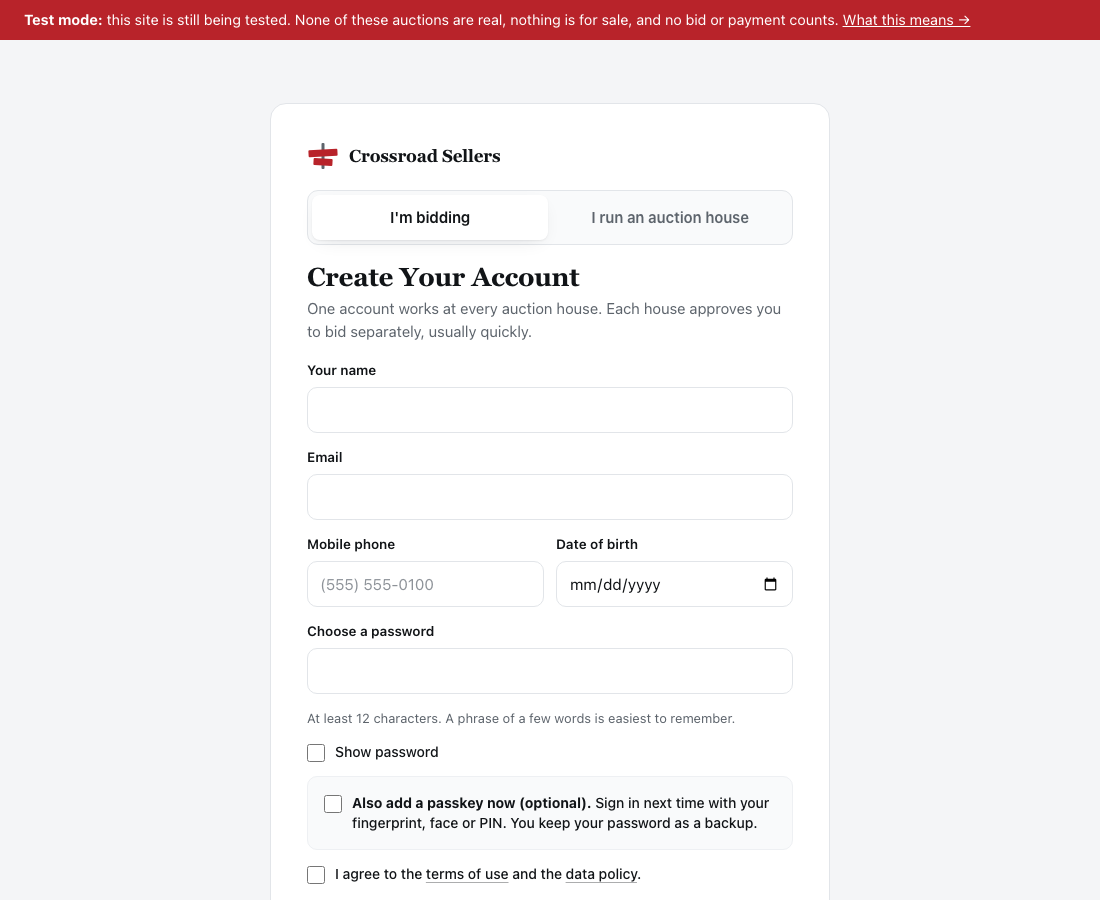
- Create your account at login.crossroadsellers.com (the page is headed Create Your Account; every Register or Create account link on the platform takes you there, and an I run an auction house tab beside it is for houses). One login for every auction house on the platform. You give your name, email, mobile phone number, date of birth and a password — the phone number is required of every bidder on the platform, and before your first bid we text it a code once — pass a quick check that you are a person (usually invisible, occasionally a small box to tick, never a picture puzzle), and confirm your email with a six-digit code typed into six squares (it continues by itself once all six are in). You are not asked to pick an auction house. Right after, you are offered a passkey for that device — Skip the Password Next Time — which you can take or skip.
- Register to bid at a house, from its site. Open any lot in one of the house's current auctions and press Register to Bid at This House (a lot that has already closed has no such button, but the house's home page offers the same thing). Agree to that house's terms of sale, add a note if you like, and press Register to Bid at (the house's name). The house's staff approve you, usually within a day, and email you your paddle number there.
Press Register on an auction house's site and you are taken to crossroadsellers.com for step 1; once your address is confirmed you are brought straight back to the lot you were looking at, where the button for step 2 is waiting.
Steps
- On any site, press Register (or Sign in if you already have a login).
- Your name, email, date of birth, and a password of ten characters or more.
- Agree to the terms of use and the data policy. Tick Analytics if you want problems reported for you automatically; leave it if not.
- Create Account, then three short steps with a progress bar across the top:
- Step 1, Email: type the six-digit code from your email. Send a New Code if it has not arrived after a minute; Wrong Email? Change It if you mistyped it.
- Step 2, Phone: a code is texted to the mobile number you gave the moment the page opens; type it. Text It Again or Wrong Number? Change It if you need to, or Skip for Now and confirm it later under Your Account → Personal Info. (While texts are not yet switched on for the platform, this step says so and moves on.)
- Step 3, Passkey: optional. Add a Passkey to sign in with your face or fingerprint next time, or Not Now. A You're In page then shows what is done, suggests adding a card before your first bid, and takes you back to the auction you came from.
- Back on the lot, press Register to Bid at This House, agree to the house's terms of sale, and press Register to Bid at (the house's name).
- Wait for the house to approve you, usually within a day. You are emailed your paddle number.
Approval
Registering at a house creates a request. The house's staff look at it, usually within a day, and approve it. Until then you can browse every lot, watch lots, and the bid button will tell you your registration is waiting. When you are approved you get a paddle number for that house and an email saying so.
The house may also set a bidding limit for you to start with, the most you can have committed at once. It rises as they get to know you; ask them if you need more for a particular auction.
One Login, Every House
Your email and password work at every auction house on the platform. Approval, though, is per house, because each house is extending you credit on its own goods. To bid at a second house, open one of its lots and press Register to bid there — no new account, no new password. Your bids, watchlist and invoices from every house are together on your account page at crossroadsellers.com, each under the house it belongs to.