Getting Help
Search here first; a question you send goes to the auction house, who reply by email.
Type your question into the help search in your own words. Matching articles appear under the box as you type, best first; press the down arrow to move into them, or Search for the full list.
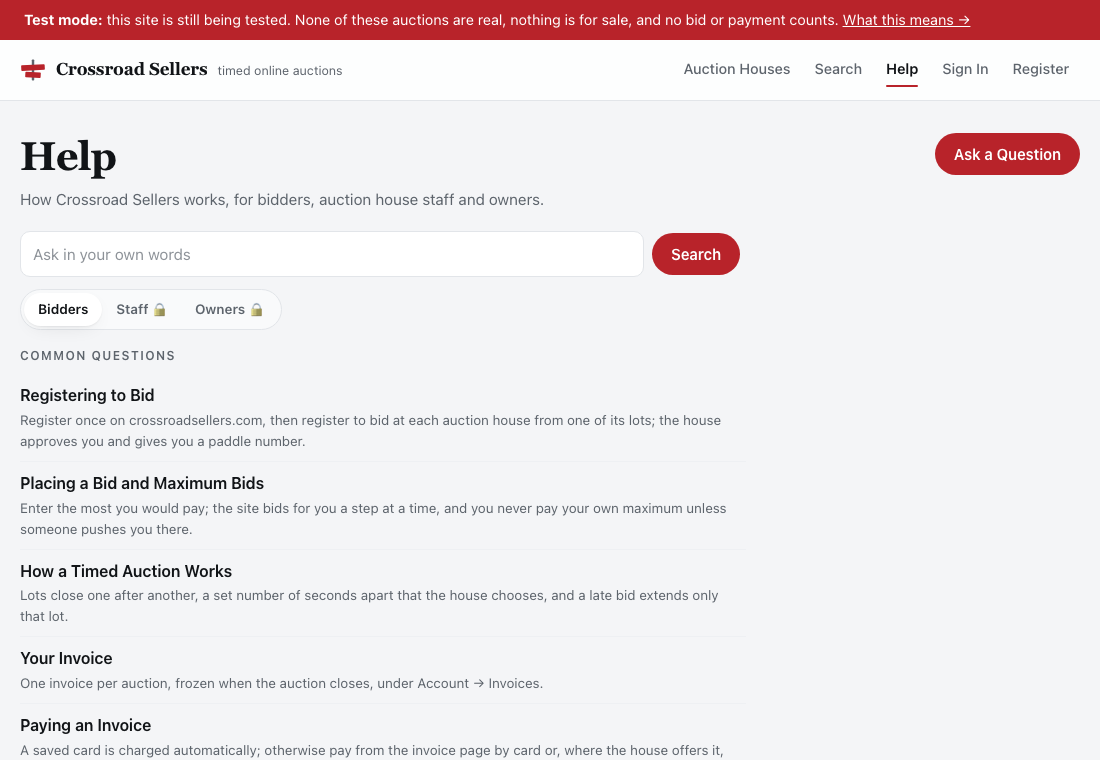
The help front opens on Common questions: the handful of pages most people need first, for whoever you are. The three tabs above them — Bidders, Staff, Owners — are there for everyone. A visitor can read the bidders' pages and see the titles of the staff and owners' pages, so a new owner knows what is covered before they have an account; opening one of those pages needs the right sign-in, and the page says so.
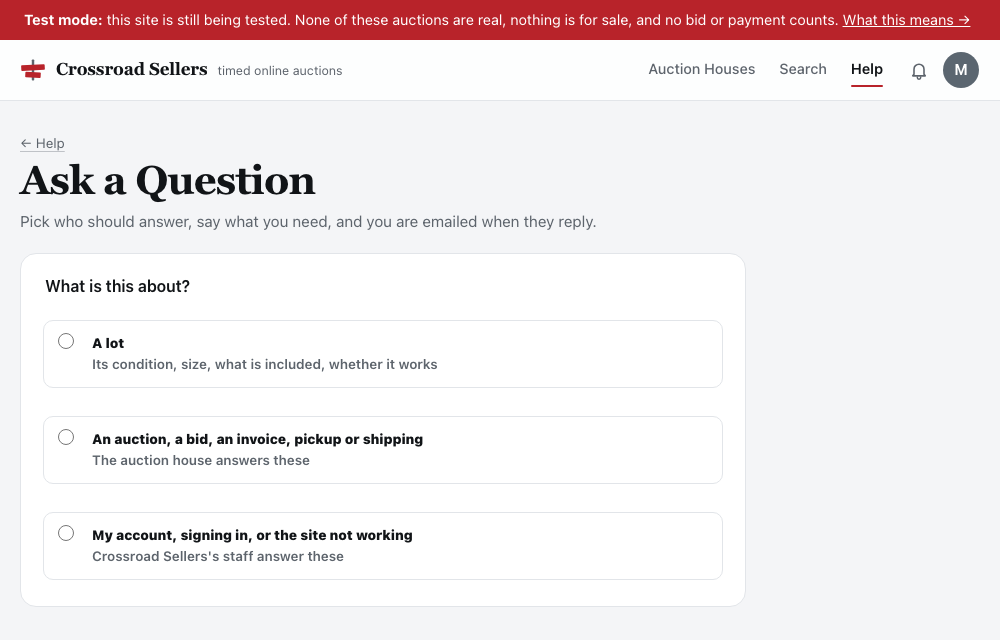
Search this help for the quick answers. For anything else, use Ask a question. The first thing it asks is What is this about?, and the answer decides who hears it:
- A lot — its condition, size, what is included. That is asked on the lot's own page, not here: the house answers under the lot, in public, so the next bidder sees it too. See Asking a question about a lot.
- An auction, a bid, an invoice, pickup or shipping — the auction house's. Your message goes to its staff, who are the people who can actually do something about it; you are emailed when they reply, and the thread opens on that house's site. On the platform's help the form asks which of your houses; arrive from a house's own site and it is picked for you.
- Your account, signing in, or the site not working — the platform's. It goes to the platform's staff.
Your open questions with a house are under My Tickets on that house's help page; questions to the platform are under My tickets here.
If something on the site itself is broken, say so in the same place; the house can pass it on to the platform's engineers.
Did This Answer It?
At the foot of every page are two buttons, Yes and No. Press one; it takes a second and needs no account. Once five people have answered, the page says how many it helped, so you can see whether a page is trusted before you rely on it. The platform's staff read the answers and rewrite the pages that fail people. If the page did not answer you, the Ask a question link beside the buttons already has the page's title filled in.
The foot of the page also says when its words last changed, so you can tell an article written this month from one that may be behind the site.
Pictures in the help are of the site as it looks today, in light mode; your own screen may be in dark mode and the buttons sit in the same places.
Searches that find nothing are kept too, without your name, and read by the platform's staff; an article often follows.
One Question Waiting at a Time
You can have one ticket waiting for an answer at a house at a time. If you try to send another while the first is still unanswered, you are taken to that ticket instead, with a note saying so: add what you want to say there. The moment the house replies, you can open a new one. Your reply on an answered ticket puts it back in their queue, so there is never a reason to open a second ticket about the same thing.
Replying by Email
Every email about a ticket can simply be replied to. Write your answer above the line that says Reply above this line, send, and it appears on the ticket within a minute, under your name, as if you had typed it on the site. Two rules keep that safe: the reply must come from the email address on your account (a copy forwarded to someone else cannot post as you), and attachments are not accepted, so put what you want to say in words. A closed ticket reopens when you reply to it. Out-of-office and other automatic replies are ignored.
How Long Tickets Are Kept
A ticket stays as long as it is open. Once it is closed it is kept for 90 days and then deleted, messages and all. Save anything you want to keep before then.
Automatic Problem Reports
If you would rather not have to report a broken page yourself, turn on Automatic Problem Reports: tick the box when you register, or use Turn On under My Tickets. From then on, when a page fails for you with a server error, the site opens a ticket with the platform's engineers by itself and a small note slides in at the bottom of the page: Automatic ticket submitted. The ticket carries the page, the time, your browser and a short reference that matches the platform's own log — never anything you typed, and nothing personal.
You only ever have one open automatic ticket at a time. If more pages fail while it is waiting on the engineers, they are noted on that same ticket (the first few listed, the rest counted) rather than opening new ones. Once the engineers reply or close it, the next failure opens a fresh one. Turn it off any time under My tickets; the setting follows your login everywhere on the platform.
When Something Breaks
If a page fails, the platform's engineers are told automatically through an error-monitoring service, with the same reference number the page shows you. What is sent is the error and where it happened. Your name, email, phone, address, payment details and anything from an identity check are stripped out before the report leaves our servers. If you said yes to analytics when you registered, a ticket is opened for you as well, so you can follow what happened. See Your data choices.
If the whole site will not load, nobody needs to report it. Checkers in several parts of the world load the site every 30 seconds and alert the platform's staff within about two minutes of it failing to answer. Wait a few minutes and try again. If an auction was closing at the time, its lots can be checked by the house afterwards.
Reporting a Security Problem
If you find a weakness in the site itself, something that lets you see or change what you should not, email [email protected] and say what you found and how to reproduce it; please do not post it publicly first. Security researchers find the same address in the site's standard security.txt file at crossroadsellers.com/.well-known/security.txt.